April 23, 2009

The Main Reasons Why Rankings Are Just A Poor Measure Of Success

. April 23, 2009 .

Are you still measuring your SEO success by the rankings you obtain? If so, you need to stop—right now!

Here’s why:

1. Rankings are constantly fluctuating. You might check rankings one minute, then check again a few minutes later and see different results.

2. Search results are sometimes geotargeted. The search engines know where you’re located by your IP address, and if they want they can (and I believe they do) sometimes point you to pages that are closer to where you are searching from, as they assume those results might be more beneficial to you.

3. Personalized search. If you’re logged into your Google or Yahoo account, you may very well be getting search results that are specifically targeted to your own preferences. It’s called personalized search, and it is a reality these days. As people use Gmail, Google Analtyics, Google AdWords, or any other free Google toy, Google learns more about you and may make specific recommendations based on this knowledge. Think about how Amazon is always making personalized recommendations for you. It wouldn’t surprise me if Google and Yahoo become more Amazon-like with their recommendations in the near future. The end result is that no two people will see the same rankings, making them an even more worthless measurement than they already are.

4. Rankings don’t equal targeted traffic. Heck, rankings don’t always even equal un-targeted traffic! If you or your SEO company optimizes your pages for keyword phrases that nobody’s searching for, your optimization efforts will all be wasted. And if you’re measuring success by how you rank for those useless keywords, you may be thinking you’re successful when you’re really not. This is actually one of the oldest tricks in the book for unscrupulous (or incompetent) SEO companies to use. They fulfill their end of the bargain—get you rankings—and you’re left scratching your head wondering why your website is still a ghost town.

5. Rankings don’t equal conversions or sales. Along the same lines of #4, all the high rankings in the world won’t matter if they don’t increase your bottom line somehow. If you receive lots of untargeted traffic, or no traffic at all, your sales will remain static.

What should you be measuring instead?

The things that matter, of course—the targeted traffic, but even more important than that—the conversions and sales. Yeah, it was nice in the old days when we could say we did our job by running ranking reports each month and pointing out all the increases to our clients. But that’s simply not going to fly these days. Today, you have to be able to show your clients a positive return on their SEO investment, or you’re just not doing your job properly.

Get with the program and start measuring the things that matter.

Educate your clients or your CEO as much as possible. It can certainly be a difficult concept for some of them to grasp, as rankings are often a vanity thing for them. But once you convince them of the lack of merit in measuring rankings, you’ll be free to throw your rank checking software out the window once and for all and be on your way to true search engine success!

Read More..

21 Top SEO and Techniques Tips for Small businesses

.

Small businesses are growing more aware of the need to understand and implement at least the basics of search engine optimization. But if you read a variety of small businesses blogs and Web sites, you’ll quickly see that there’s a lot of uncertainty over what makes up “the basics.” Without access to high-level consulting and without a lot of experience knowing what SEO resources can be trusted, there’s also a lot of misinformation about SEO strategies and tactics.

This article is the second in a SEO checklist specifically for small business owners and webmasters. Naturally, this week addresses the “Do’s”—things to make sure you include whether you’re hiring an SEO company or doing it yourself.

Small Business SEO Checklist: The Do’s

1. Commit yourself to the process. SEO isn’t a one-time event. Search engine algorithms change regularly, so the tactics that worked last year may not work this year. SEO requires a long-term outlook and commitment.

2. Be patient. SEO isn’t about instant gratification. Results often take months to see, and this is especially true the smaller you are, and the newer you are to doing business online.

3. Ask a lot of questions when hiring an SEO company. It’s your job to know what kind of tactics the company uses. Ask for specifics. Ask if there are any risks involved. Then get online yourself and do your own research—about the company, about the tactics they discussed, and so forth.

4. Become a student of SEO. If you’re taking the do-it-yourself route, you’ll have to become a student of SEO and learn as much as you can. Luckily for you, there are plenty of great Web resources (like Search Engine Land) and several terrific books you can read. Aaron Wall’s SEO Book, Jennifer Laycock’s Small Business Guide to Search Engine Marketing, and Search Engine Optimization: An Hour a Day by Jennifer Grappone and Gradiva Couzin are three I’ve read and recommend.

5. Have web analytics in place at the start. You should have clearly defined goals for your SEO efforts, and you’ll need web analytics software in place so you can track what’s working and what’s not.

6. Build a great web site. I’m sure you want to show up on the first page of results. Ask yourself, “Is my site really one of the 10 best sites in the world on this topic?” Be honest. If it’s not, make it better.

7. Include a site map page. Spiders can’t index pages that can’t be crawled. A site map will help spiders find all the important pages on your site, and help the spider understand your site’s hierarchy. This is especially helpful if your site has a hard-to-crawl navigation menu. If your site is large, make several site map pages. Keep each one to less than 100 links. I tell clients 75 is the max to be safe.

8. Make SEO-friendly URLs. Use keywords in your URLs and file names, such as yourdomain.com/red-widgets.html. Don’t overdo it, though. A file with 3+ hyphens tends to look spammy and users may be hesitant to click on it. Related bonus tip: Use hyphens in URLs and file names, not underscores. Hyphens are treated as a “space,” while underscores are not.

9. Do keyword research at the start of the project. If you’re on a tight budget, use the free versions of Keyword Discovery or WordTracker, both of which also have more powerful paid versions. Ignore the numbers these tools show; what’s important is the relative volume of one keyword to another. Another good free tool is Google’s AdWords Keyword Tool, which doesn’t show exact numbers.

10. Open up a PPC account. Whether it’s Google’s AdWords or Yahoo’s Search Marketing or something else, this is a great way to get actual search volume for your keywords. Yes, it costs money, but if you have the budget it’s worth the investment. It’s also the solution if you didn’t like the “Be patient” suggestion above and are looking for instant visibility.

11. Use a unique and relevant title and meta description on every page. The page title is the single most important on-page SEO factor. It’s rare to rank highly for a primary term (2-3 words) without that term being part of the page title. The meta description tag won’t help you rank, but it will often appear as the text snippet below your listing, so it should include the relevant keyword(s) and be written so as to encourage searchers to click on your listing. Related bonus tip: You can ignore the Keywords meta altogether if you’d like; it’s close to inconsequential. If you use it, put misspellings in there, and any related keywords that don’t appear on the page.

12. Write for users first. Google, Yahoo, etc., have pretty powerful bots crawling the web, but to my knowledge these bots have never bought anything online, signed up for a newsletter, or picked up the phone to call about your services. Humans do those things, so write your page copy with humans in mind. Yes, you need keywords in the text, but don’t stuff each page like a Thanksgiving turkey. Keep it readable.

13. Create great, unique content. This is important for everyone, but it’s a particular challenge for online retailers. If you’re selling the same widget that 50 other retailers are selling, and everyone is using the boilerplate descriptions from the manufacturer, this is a great opportunity. Write your own product descriptions, using the keyword research you did earlier (see #9 above) to target actual words searchers use, and make product pages that blow the competition away. Plus, retailer or not, great content is a great way to get inbound links.

14. Use your keywords as anchor text when linking internally. Anchor text helps tells spiders what the linked-to page is about. Links that say “click here” do nothing for your search engine visibility.

15. Build links intelligently. Submit your site to quality, trusted directories such as Yahoo, DMOZ, Business.com, Aviva, and Best of the web. Seek links from authority sites in your industry. If local search matters to you (more on that coming up), seek links from trusted sites in your geographic area—the Chamber of Commerce, etc. Analyze the inbound links to your competitors to find links you can acquire, too.

16. Use press releases wisely. Developing a relationship with media covering your industry or your local region can be a great source of exposure, including getting links from trusted media web sites. Distributing releases online can be an effective link building tactic, and opens the door for exposure in news search sites. Related bonus tip: Only issue a release when you have something newsworthy to report. Don’t waste journalists’ time.

17. Start a blog and participate with other related blogs. Search engines, Google especially, love blogs for the fresh content and highly-structured data. Beyond that, there’s no better way to join the conversations that are already taking place about your industry and/or company. Reading and commenting on other blogs can also increase your exposure and help you acquire new links. Related bonus tip: Put your blog at yourdomain.com/blog so your main domain gets the benefit of any links to your blog posts. If that’s not possible, use blog.yourdomain.com.

18. Use social media marketing wisely. If your small business has a visual element, join the appropriate communities on Flickr and post high-quality photos there. If you’re a service-oriented business, use Yahoo Answers to position yourself as an expert in your industry. With any social media site you use, the first rule is don’t spam! Be an active, contributing member of the site. The idea is to interact with potential customers, not annoy them.

19. Take advantage of local search opportunities. Online research for offline buying is a growing trend. Optimize your site to catch local traffic by showing your address and local phone number prominently. Write a detailed Directions/Location page using neighborhoods and landmarks in the page text. Submit your site to the free local listings services that the major search engines offer. Make sure your site is listed in local/social directories such as CitySearch, Yelp, Local.com, etc., and encourage customers to leave reviews of your business on these sites, too.

20. Take advantage of the tools the search engines give you. Sign up for Google’s webmaster Central and Yahoo’s Site Explorer to learn more about how the search engines see your site, including how many inbound links they’re aware of.

21. Diversify your traffic sources. Google may bring you 70% of your traffic today, but what if the next big algorithm update hits you hard? What if your Google visibility goes away tomorrow? Newsletters and other subscriber-based content can help you hold on to traffic/customers no matter what the search engines do. In fact, many of the DOs on this list—creating great content, starting a blog, using social media and local search, etc.—will help you grow an audience of loyal prospects and customers that may help you survive the whims of search engines.

Your additions are welcome in the comments.

With this checklist and last week’s list of “Don’ts,” you should be able to develop a good plan of attack for your SEO efforts for your small business.

Read More..
Online Tips On How to add website shortcuts to the Windows Start Menu

.

Looking for a way to add program shortcuts to the Start Menu? Ever thought about adding website (URL) shortcuts to your Start Menu? It’s actually quite useful! I personally use Firefox for my browsing needs, but I still hate having to browse through my ridiculously long list of bookmarks just to open my email (yes I could just type in gmail, but I’m too lazy to type it)!

So basically with only two clicks, hence the name, you can load up any web page! Nifty, but the only problem is that you need to have that start page open whenever you want to open a new website, which basically means more than two clicks again!

If you want to simply be able to open a web site with only two clicks no matter if you have a browser window open or not, then you might try adding URLs to the Start Menu. In this way, you can pin a couple of your favorite sites and have instant access to them!

How to add website links to the Start Menu

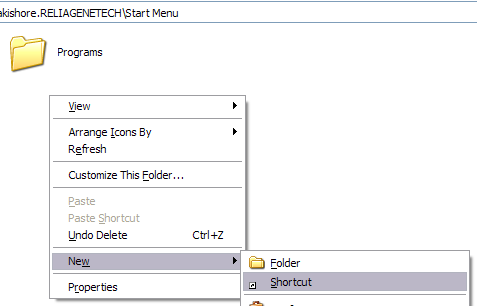
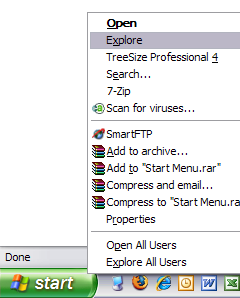
First, you need to right-click on the Start button and click on Explore.

start explore

This will open Windows Explorer in the Start Menu folder under your user profile. If you want to be able to add the website shortcut to the Start Menu for all users, when you right-click, choose Explore All Users instead of Explore. There should be a folder called Programs also, don’t go into that folder.

Now right-click and choose New and then Shortcut.

new shortcut

In the box “Type the location of the item”, go ahead and type in the URL for the website you want to add. For example, type in http://www.online-tech-tips.com and click Next.

create shortcut

Give your shortcut a name in the “Type a name for this shortcut” box. This will be the title shown in the Start Menu and it can be whatever you like.

creating shortcuts

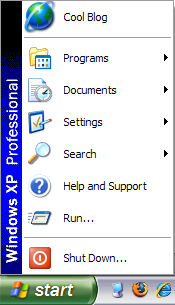
Click Finish and you’re done! There is one thing to remember when it comes to adding website shortcuts to the Start Menu and that is which version of the start menu are you using. If you’re using the Classic Start Menu, your link will appear at the top, above the Programs group like shown below:

start menu

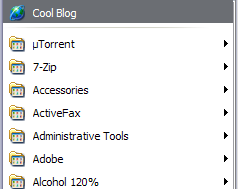
However, if you’re using the normal Windows Start Menu that comes with Windows XP, by default the link will only appear when you click Start and then click on Programs like shown below.

start menu programs

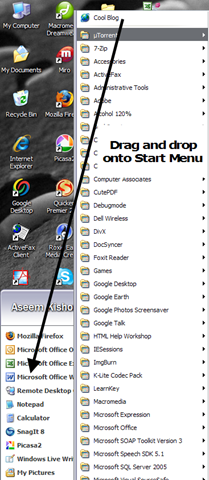
However, that’s not what we want! We want to be able to click on Start and then simply click on our link, not have to click on Programs first! Luckily it’s very easy to get your link into the main section of the Start Menu and that is by simply opening the programs list and then dragging and dropping the URL to where you want it.

drag and drop

Drag it between any two programs listed and you’ll see that it becomes a dark black line, meaning you can release the mouse button and it will drop it in between the other two shortcuts.

start menu links

And now that’s it! Hopefully, this was not too complicated of a process! There is no need to edit the registry as some sites suggest, it can all be done via creating a simple shortcut! Enjoy!

Read More..

Using Live Writer to add social bookmarking tags

.

Social bookmarking is used for storing bookmarks of useful web pages on the Net. In a social bookmarking system, users save links to web sites they want on their own social website account. For example, if you have a Yahoo! account, you can click the image below to add the your URL to your Yahoo! account:

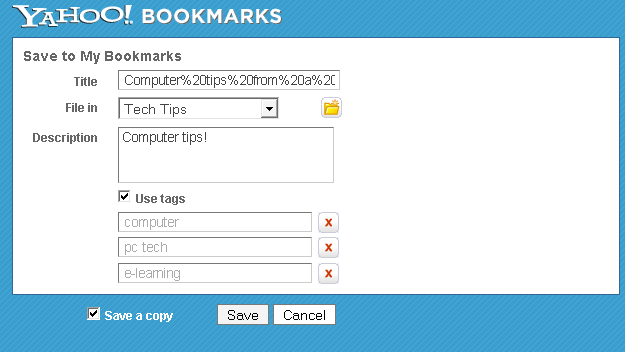
It would then open your Yahoo! bookmarks page prompting you to save the link:

image

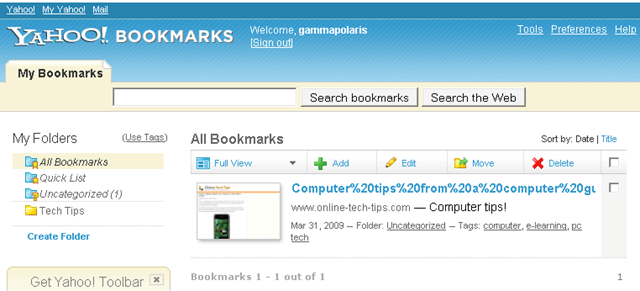
You could then see the bookmark on the bookmarks.yahoo.com site:

image

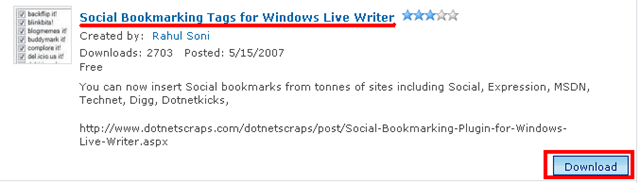
Now that you know how to use the bookmarks when you see them, let me show you how to create link icons for several bookmarking sites so you can put them on your own blogs or web sites. To do this on Live Writer, download the plugin from http://gallery.live.com/liveItemDetail.aspx?li=d2597790-f998-46be-bbe5-caa4a007e0f0&bt=9&pl=8

image

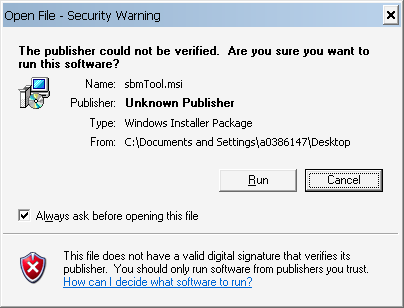
Click the download button as shown above and then run the file once it is completed downloading.

image

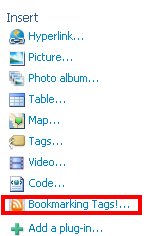
After running the file, open Windows Live Writer and then make a post where you want to put the icons. Click the Bookmarking Tags! plug-in under the insert panel:

image

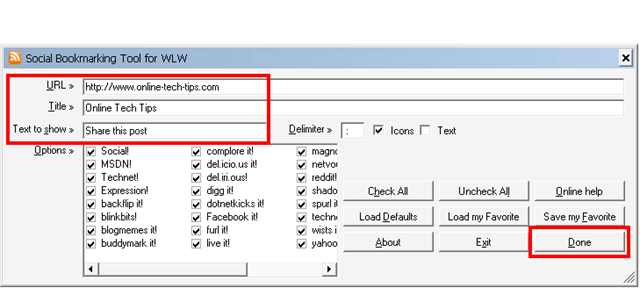
Enter the URL of the site you want to bookmark, a descriptive title and “text to show” that will act as a label on the left side of the icons. You may choose from the available bookmarking sites but all are selected by default. Click done to create the icons:

image

If you look on the source code, the plug-in automated the generation of the code and the icons are preloaded also, so you don’t have to figure out the right URL syntax for each bookmarking service.

Read More..

April 11, 2009

Get keyword ideas using the Google Keyword Tool

Search engines use keywords to identify which sites match a particular search phrase. SEOs need to identify which keywords are searched for so that they can use those keywords and get found by the search engines and eventually by their target audience.

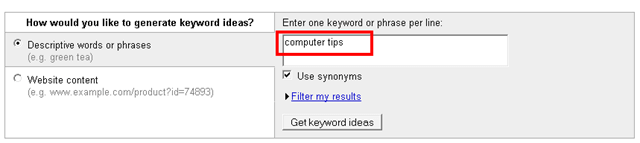
For example, if you want to optimize a website about “computer tips” you should see how many searches for the keyword are being submitted to Google monthly so you can have an idea if readers are looking for you or not. You can do that by going to external Google Keyword Tool:

https://adwords.google.com/select/KeywordToolExternal

Enter the keyword or phrase that you want to analyze then click Get keyword ideas:

image

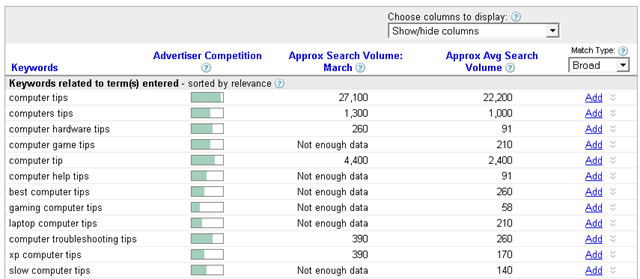
You will see a tabular report of all related terms along with the search volume generated for the previous month and the average search volume.

image

In this report you will see if you are using the right keywords based on the Google search database. If you think you should target “computer tip” instead of “computer tips” then think again because the difference on the performance of each phrase is about ten times for “computer tips” (22,200 VS 2,400).

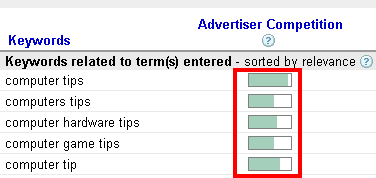
Also take note of the advertiser competition information, the longer the bar the more fierce the competition:

image

If you are a starting up a new web site and the competition is strong, it is a good idea to start with keywords with less competition then work on those higher volume keywords later.

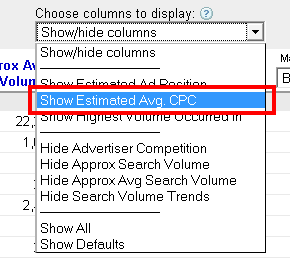
Another cool feature of this tool is that it can show you the average cost each time a user clicks your ad on the associated keyword. To add the estimate cost per click (CPC) column on the report, go to the dropdown selection labeled “Choose columns to display” then click “Show estimated Avg. CPC”.

image

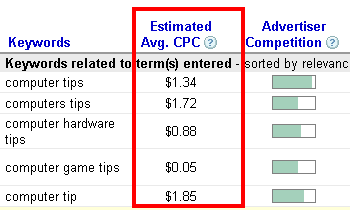
You should see the CPC column on the report:

image

Isn’t it a very convenient way to analyze your web site’s earning potential? This way you can earn more money by targeting keywords with higher CPC. Well, that is of course if you can make them come to your website. We will show you how to do just that in the future articles as we go into more in-depth SEO tips.

Read More..
 
Home | About | Contact | Advertise | Wholesale Clothing