Showing posts with label Blogging Tips. Show all posts

April 24, 2009

Online Bloggers should host your blog On your own site?

. April 24, 2009 .

With so many people deciding to start blogging, one of the first questions they ask is, "Where should it go?" I get that question all the time, but especially from those savvy in organic search marketing, because they are concerned about the links coming into the blog counting for improved search rankings. Should they be?


I say no. Not everyone agrees with me, and they might be smarter than me, but here's my reasoning.


If you host your blog on your own site, that's beneficial for your site's search rankings, because all the links you get to your blog raise the perceived importance of your site. That was my thinking when I set up my blog on my Web site and I think it worked just fine.


But in retrospect, I think setting my blog up elsewhere would have worked just fine, also. If I had set up my blog on a separate Web site, even a free one like Blogger, I'd have attracted links to my blog, which would improve the blog's perceived importance, and my blog would be linking to my Web site anyway, passing along value to my Web site. In addition, when someone searched for me, I'd have two sites coming up in the results instead of just one.


Which approach works better? Who knows? It might make no difference at all.


Which, unfortunately, leads us back to our original question. Where should you host your blog? I think you should look at non-search factors to make your decision.


If you are the kind of person who likes to tinker with the look and feel of your blog, and doesn't mind getting your hands dirty installing software, grab WordPress or Movable Type and have at it. Go install the blogging software on your site and customize to your heart's content.


But if you think you need to wash your hands after handling a tar file, you're better off using something simple, regardless of where it's hosted. If you are fine with picking between the available styles and haven't ever changed the default wallpaper on your computer, don't drive yourself nuts now. It will just set up an impediment that keeps you from blogging.


It's more important that you start blogging and that you write stuff that people want to read. I think if you do that, then you'll get attention and it will help you. Whether the attention comes straight to your Web site or takes a slight detour along the way isn't that important. If you're blog is good, it won't matter where you host it.

Read More..

April 23, 2009

How Bloggers Make Money from Blogs?

. April 23, 2009 .

I’ve been reflecting this week about the amazing diversity of opportunities that are opening up for bloggers to make money from blogging.


I’ve long advised that bloggers seeking to make money from blogging spread their interests across multiple revenue streams so as not to put all their eggs in one basket.


The wonderful thing is that this is becoming easier and easier to do 2005 has seen many options opening up. I thought I’d take a look at some of the methods that bloggers are currently using to make money through blogs.


Income Streams for Bloggers - How to Make Money Blogging


Advertising Programs - Perhaps the most obvious changes in the past few months have been with the addition of a variety of viable advertising options for bloggers looking to make money from their blogs. The most common way bloggers seem to earn money online is via the contextual ad program from Google - Adsense. A more recent addition that many are using successfully are Chitika’s eMiniMalls and WidgetBucks, Text Link Ads.

Azoogle Ads, Intelli Txt, DoubleClick, Tribal Fusion, Adbrite, Clicksor, AdHearUs, Kanoodle, Pheedo, TextAds, Bidvertiser, Fastclick and Value Click (to name just some of the options) and there is a smorgasbord of options. Of course there is more to come with MSN Adcenter and YPN both in beta testing and with a variety of other advertising system currently in development (YPN is only available to US publishers).

Lastly there’s BlogAds - one of the first blog specific ad networks.


RSS Advertising - The past 12 months have seen some advances in RSS Advertising also. I’m yet to hear of any bloggers making big money blogging through it to this point - but as improvements are made to the ad programs exploring this I’m sure we’ll start to see examples of it being profitable.


Sponsorship - In addition to the array of advertising programs that are available to join there is a growing awareness in the business of the value and opportunity that exists for them to advertise directly on blogs. I’m hearing more and more examples of this and have been fortunately to have a couple of ad campaigns of my own in the past month - one with Adobe a couple of weeks ago and another just completed with Ricoh for a new digicam over at my Digital Camera Blog. These are not isolated cases - as I say I know of many blogs exploring sponsorship with advertisers at present and suspect we’ll see more of it in the year ahead. Sponsorship is also happening on a post by post basis with some bloggers being paid to write on certain topics by companies - either in one off or a regular fashion - and they are able to make big money from their blogs doing so.


Affiliate Programs - There are larger affiliate programs like Amazon, Linkshare, Clickbank and Commission Junction but also literally thousands of others from the large to the very small.


Digital Assets - Increasing numbers of bloggers have been developing other digital assets to support and add revenue streams to their blogs. By this I mean that I’m increasingly seeing e-books, courses and tele-seminars being run by bloggers. My recent foray into this with the first series of the six figure blogging course that Andy and I ran a few weeks ago and have just released the study version of. This type of activity will only increase in future - in fact this week I’ve seen numerous examples of bloggers running courses.


Blog Network Opportunities - with the rise in popularity of Blog Networks - bloggers are also being presented with more places to earn an income from their blogging - by writing for and with others. While it might be difficult to get a writing gig with one of the bigger networks - there are plenty who are always asking for new bloggers to join and who are willing to pay bloggers using a variety of payment models. While there are distinct advantages of blogging for yourself - blogging for an established network who will handle a lot of the set up/promotion/admin/SEO etc has it’s advantages also. More and more bloggers are combining writing for themselves on their own blogs with taking on blog network blogs as additional income streams.


Business Blog Writing Opportunities - as blogging has risen in it’s profile as a medium more and more businesses are starting blogs. Many of these companies have internal staff take on blogging duties - but an increasing number of them are hiring specialist bloggers to come on and run their blogs. I know of a number of bloggers who in the past month or two have been approached for such paid work. Check out Bloggers for Hire if you’re looking for this type of work.


Non Blogging Writing Opportunities - Also becoming more common are bloggers being hired to write in non blogging mediums. Manolo’s recent coup of a column in the Washington Post is just one example of this as bloggers are increasingly being approached to write for newspapers, magazines and other non blog websites. Along side this is the rise of bloggers as published book authors - this is to the extent that one blogger I spoke with this week complained to me that they were one of the few bloggers than they knew who didn’t have a book deal!


Donations - Tip Jars and donation buttons have been a part of blogging for years now but this last year saw a number of bloggers go full time after fund raising drives. Perhaps the most high profile of these was Jason Kottke of kottke.org who through the generosity of his readership was able to quit his job and become a full time blogger.


Flipping Blogs - Also more common in 2005 was the practice of ‘Blog Flipping’ - or selling of blogs. This has happened both on an individual blog level (I can think of about 20 blogs that sold this year) but also on a network level (the most obvious of these being the 8 figure sale of Weblogs Inc to AOL).


Merchandising - My recent attempt to sell ProBlogger.net T-shirts wasn’t a raging success, but it is an example of how an increasing number of bloggers are attempting to make a few extra dollars from their blogs by selling branded products through programs like Cafepress. While I didn’t have a lot of success with merchandising - quite a few larger blogs are seeing significant sales - especially blogs with a cult following. I’m not at liberty to discuss details - but I know of one largish blog which will see sales over $20,000 in merchandise for the calendar year of 2005.


Consulting and Speaking - While it has been popular for established consultants to add blogs to their businesses we’re also starting to see bloggers with no consulting background able to make money by charging readers for their time in consulting scenarios BECAUSE of the profile that their blogs have built them. Blogging has the ability to establish people as experts on niche topics and we all know the value of being perceived as an expert. I spoke to one blogger last month who charges himself out at over $200 an hour for speaking and consulting work - his area of expertise was something that he knew little about 18 months ago - but through his blog he’s become a leader in his field and a minor celebrity in his industry.


As time rolls on there are more and more ways that bloggers make money from their blogs opening up. Feel free to suggest your own ideas and experiences in comments below.


Also check out these resources on how to set up a profitable blog:


Read More..
Online Tips On How to add website shortcuts to the Windows Start Menu

.

Looking for a way to add program shortcuts to the Start Menu? Ever thought about adding website (URL) shortcuts to your Start Menu? It’s actually quite useful! I personally use Firefox for my browsing needs, but I still hate having to browse through my ridiculously long list of bookmarks just to open my email (yes I could just type in gmail, but I’m too lazy to type it)!

So basically with only two clicks, hence the name, you can load up any web page! Nifty, but the only problem is that you need to have that start page open whenever you want to open a new website, which basically means more than two clicks again!

If you want to simply be able to open a web site with only two clicks no matter if you have a browser window open or not, then you might try adding URLs to the Start Menu. In this way, you can pin a couple of your favorite sites and have instant access to them!

How to add website links to the Start Menu

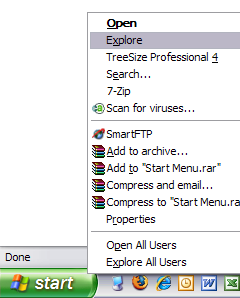
First, you need to right-click on the Start button and click on Explore.

start explore

This will open Windows Explorer in the Start Menu folder under your user profile. If you want to be able to add the website shortcut to the Start Menu for all users, when you right-click, choose Explore All Users instead of Explore. There should be a folder called Programs also, don’t go into that folder.

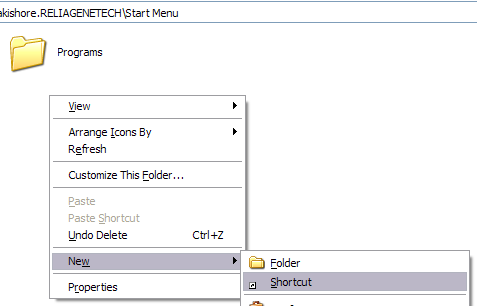
Now right-click and choose New and then Shortcut.

new shortcut

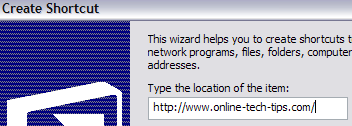
In the box “Type the location of the item”, go ahead and type in the URL for the website you want to add. For example, type in http://www.online-tech-tips.com and click Next.

create shortcut

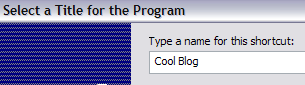
Give your shortcut a name in the “Type a name for this shortcut” box. This will be the title shown in the Start Menu and it can be whatever you like.

creating shortcuts

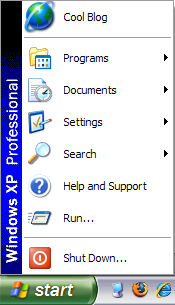
Click Finish and you’re done! There is one thing to remember when it comes to adding website shortcuts to the Start Menu and that is which version of the start menu are you using. If you’re using the Classic Start Menu, your link will appear at the top, above the Programs group like shown below:

start menu

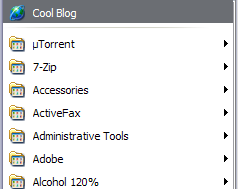
However, if you’re using the normal Windows Start Menu that comes with Windows XP, by default the link will only appear when you click Start and then click on Programs like shown below.

start menu programs

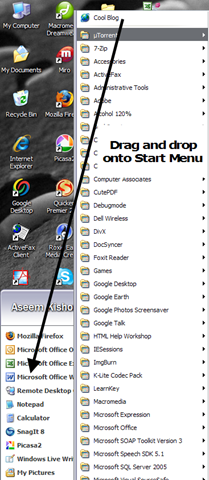
However, that’s not what we want! We want to be able to click on Start and then simply click on our link, not have to click on Programs first! Luckily it’s very easy to get your link into the main section of the Start Menu and that is by simply opening the programs list and then dragging and dropping the URL to where you want it.

drag and drop

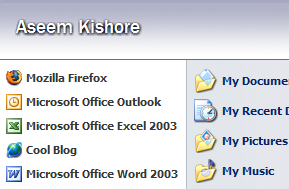
Drag it between any two programs listed and you’ll see that it becomes a dark black line, meaning you can release the mouse button and it will drop it in between the other two shortcuts.

start menu links

And now that’s it! Hopefully, this was not too complicated of a process! There is no need to edit the registry as some sites suggest, it can all be done via creating a simple shortcut! Enjoy!

Read More..

Using Live Writer to add social bookmarking tags

.

Social bookmarking is used for storing bookmarks of useful web pages on the Net. In a social bookmarking system, users save links to web sites they want on their own social website account. For example, if you have a Yahoo! account, you can click the image below to add the your URL to your Yahoo! account:

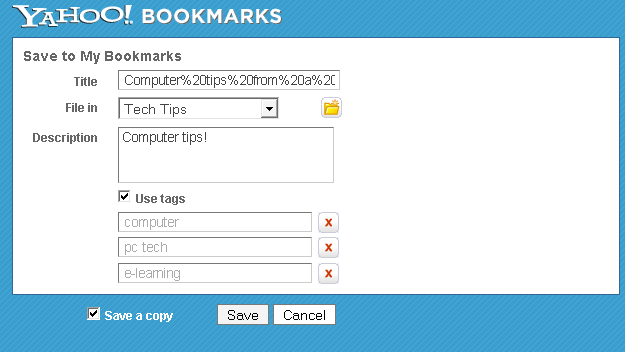
It would then open your Yahoo! bookmarks page prompting you to save the link:

image

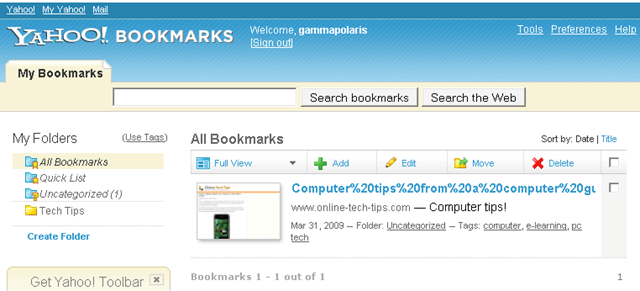
You could then see the bookmark on the bookmarks.yahoo.com site:

image

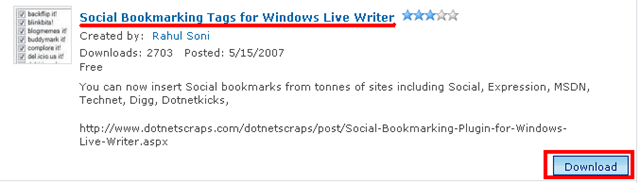
Now that you know how to use the bookmarks when you see them, let me show you how to create link icons for several bookmarking sites so you can put them on your own blogs or web sites. To do this on Live Writer, download the plugin from http://gallery.live.com/liveItemDetail.aspx?li=d2597790-f998-46be-bbe5-caa4a007e0f0&bt=9&pl=8

image

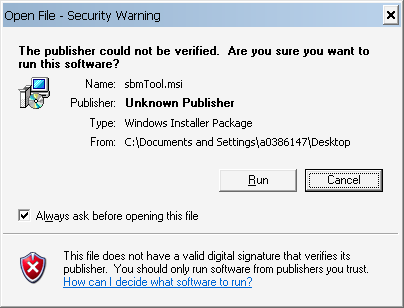
Click the download button as shown above and then run the file once it is completed downloading.

image

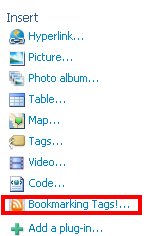
After running the file, open Windows Live Writer and then make a post where you want to put the icons. Click the Bookmarking Tags! plug-in under the insert panel:

image

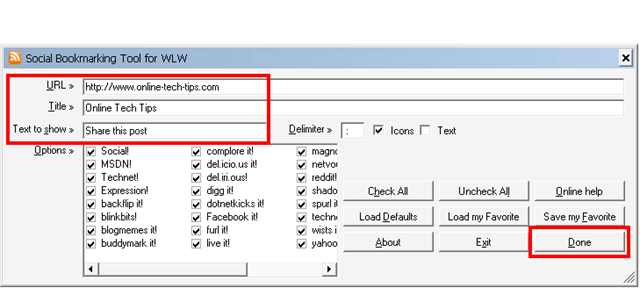
Enter the URL of the site you want to bookmark, a descriptive title and “text to show” that will act as a label on the left side of the icons. You may choose from the available bookmarking sites but all are selected by default. Click done to create the icons:

image

If you look on the source code, the plug-in automated the generation of the code and the icons are preloaded also, so you don’t have to figure out the right URL syntax for each bookmarking service.

Read More..
 
Home | About | Contact | Advertise | Wholesale Clothing